Questions, answered.
Price, watches, charts, units and your data. Everything Rocky does is on the features page.
What does it cost?
Rocky is free for 14 days, no card needed. After that it's €20 a month, VAT included, and you can cancel anytime. Subscribe during the trial and the first payment is only taken when the trial ends.
Which Garmin watches work with Rocky?
Any Garmin watch or bike computer that syncs with the Garmin Connect app. Your activities, sleep, HRV and daily summaries reach Rocky every time your device syncs. Sending workouts to the watch needs a device that supports Garmin structured workouts.
Do I need a Garmin?
Yes. Rocky coaches from your Garmin Connect data, so it works best if you already train with a Garmin watch or device.
How is Rocky different from Garmin Coach or a training-plan app?
Plan apps and Garmin Coach generate workouts and recalculate silently. Rocky builds a plan toward your goal, reads every session, night and HRV reading, and you can talk to it: tell it you slept badly or your knee hurts, and it reshapes the week and explains why.
Is Rocky an AI?
Yes. Rocky's replies are written by an AI model (Claude, from Anthropic), working from your Garmin data, your goals and what you've told it. That's why it can answer at any hour and remember the details. The training metrics, the plan on your watch and the rules it follows are built by us, and nothing changes on your watch without your yes.
Can Rocky put workouts on my watch?
Yes. When you agree on a session, Rocky sends it to your Garmin Connect calendar with warm-up, intervals and pace or heart-rate targets, and it's on your watch after the next sync. Running, cycling, pool swimming and strength training. Nothing is sent without your yes.
Can my sessions show up in Google Calendar?
Yes. Connect Google Calendar in Settings and every session Rocky schedules on your Garmin also appears in a calendar called Rocky. Ask for a set time and it's placed there, otherwise it's an all-day entry. It only goes one way, and Rocky can't see your other calendars.
Where do I find my training plan?
In the chat. Rocky writes your plan down and keeps it up to date, so you can ask for the whole season, next week or the exact steps of a session at any time. Sessions you agree on can also go to your watch.
Does Rocky show charts of my training?
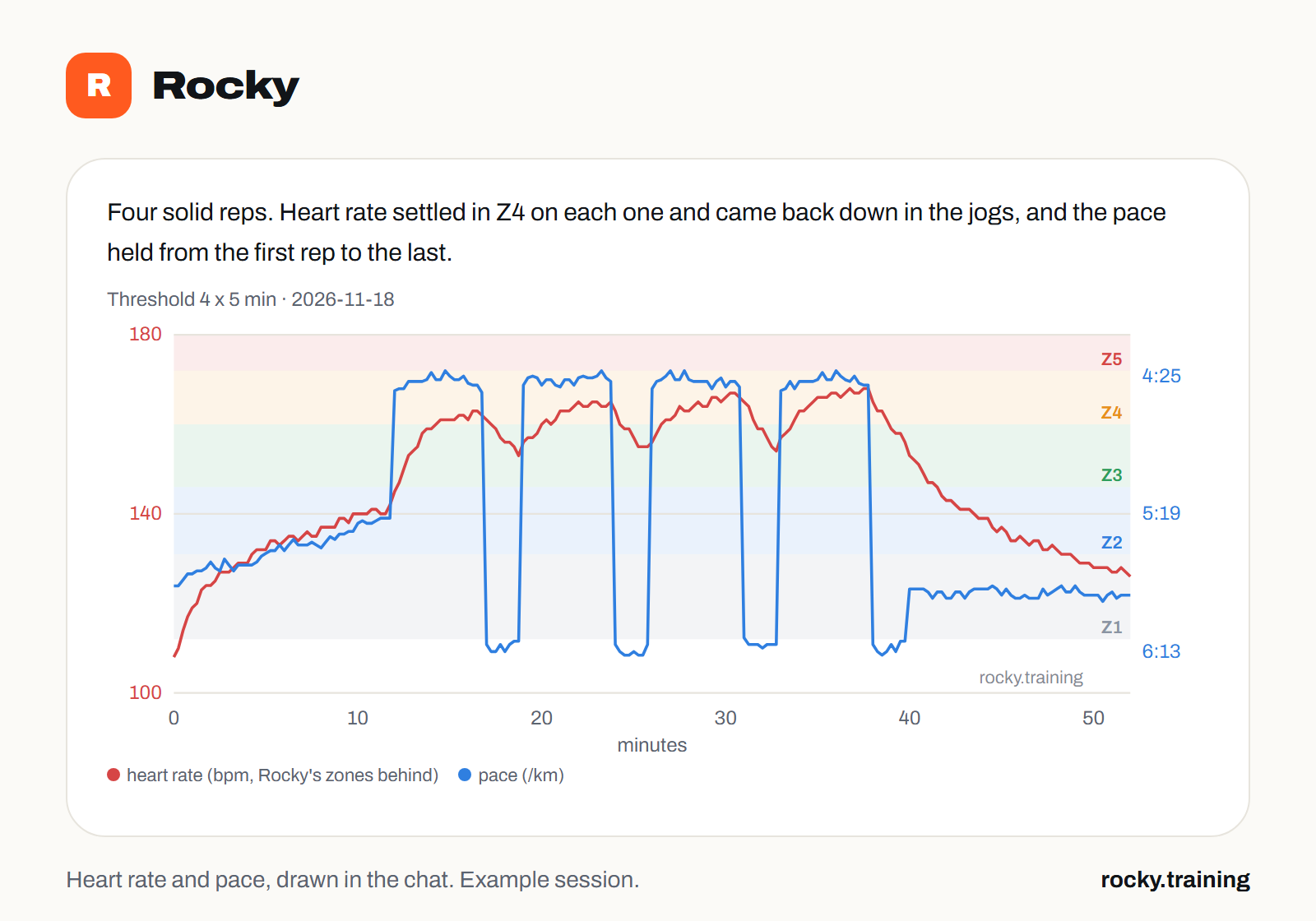
Yes, right in the chat. When you go through a session, Rocky can draw it from your watch's data, for example heart rate against pace with your zones behind. When recovery is the question, it shows your HRV or resting heart rate over the last four weeks. Splits, time in zones, pool swims length by length and more are there when you ask, and you can tell Rocky you'd rather have just the words.
Can I see DFA alpha 1?
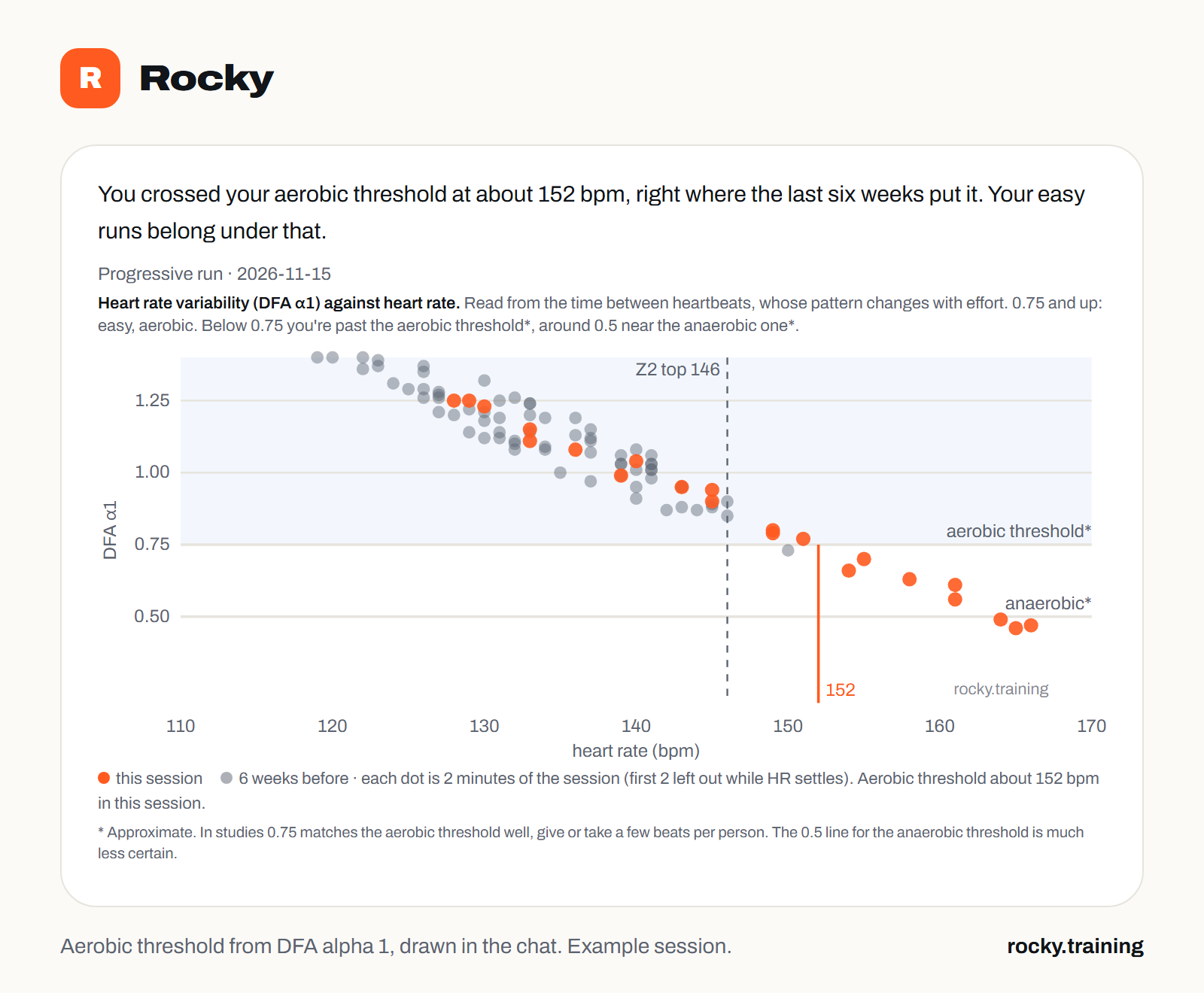
Yes, if your watch records your heartbeats beat by beat. You need a good chest strap (a wrist sensor isn't precise enough), and HRV logging may have to be turned on in the watch (on most Garmin models: Settings > System > Data Recording > Log HRV). Rocky then reads every session on its own, estimates your aerobic threshold and shows the chart in the chat when you go through the session.
Can Rocky see my older training history?
Rocky receives your data from the day you connect Garmin Connect; Garmin doesn't send earlier history. If you'd like older history brought in, email hello@rocky.training.
Do I need to install anything?
No. Rocky runs in your browser, on your phone or computer. You connect your Garmin Connect™ account once, and new data arrives on its own whenever your watch syncs.
Is there a Rocky app?
Not in the App Store or Google Play. Rocky runs at rocky.training in your phone's browser, and you can put it on your home screen so it opens like an app: on iPhone, tap Share in Safari and then Add to Home Screen; on Android, open the menu in Chrome and tap Add to home screen.
What languages does Rocky speak?
Rocky answers in the language you write in: English, Swedish and most others.
Can I use miles, or yards in the pool?
Yes. Under Settings you choose metric, US or UK units, the same three choices as Garmin Connect. Rocky then talks, plans and draws charts in your units: pace per km or per mile, pool swims in metres or yards, and the workouts it sends to your watch follow them too. Rocky picks a starting choice from where you are, and you can change it at any time.
Is my data safe?
Your data is used only to coach you, stored in the EU, and never sold or used for ads. Disconnect Garmin and Rocky stops receiving data at once.
Can Rocky help with my sore knee?
Rocky can adapt your training around a niggle by swapping impact for cycling or swimming, easing the week or moving the hard session, and it will tell you when something sounds like it needs a professional. But Rocky is an AI coach, not a doctor, physiotherapist or other healthcare provider: it can't diagnose or treat injuries or illness. If something hurts, gets worse or doesn't settle, see a doctor or physio.
Does it replace my coach?
No. Think of Rocky as the coach in your pocket between sessions, there to adjust the plan and answer the questions you have at 10pm before a hard workout.
Something else? Email hello@rocky.training.